Unmanned Inspection Workstation | Automated Batch Testing
An unattended batch inspection workstation: automated storage, robot sampling, vision identification, inspection modules and data archiving for laboratories.

Unmanned Inspection Workstation
Load the samples at the end of the shift, read the results at the start of the next one. Batch inspection goes from one part at a time to one night: automatic loading, sampling, inspection, judgement, sorting and data archiving in one continuous unattended flow.
The unmanned inspection workstation, in short
It combines automated storage, a robot, vision recognition, inspection modules and a data system into one cell that inspects batches of samples automatically: samples are loaded in bulk, identified, picked, carried to the inspection module, judged, sorted and archived without an operator. It removes the piece-by-piece manual handling of batch inspection and the idle night capacity. It fits laboratories, incoming inspection, in-process sampling, final inspection and material testing where batches of samples have to be checked and recorded.
Load at the end of the shift, read the results at the start of the next
This one scenario is the reason the workstation exists.
One batch of samples is loaded, the task and the inspection items are confirmed, and the task is started.
The system samples, inspects, judges, sorts and archives on the preset task; an exception pauses the task, alarms and is recorded.
Results are reviewed, re-check and exception samples are handled, and the data is exported.
One loading, automatic inspection, data archived automatically. This scenario is the reason the workstation exists.
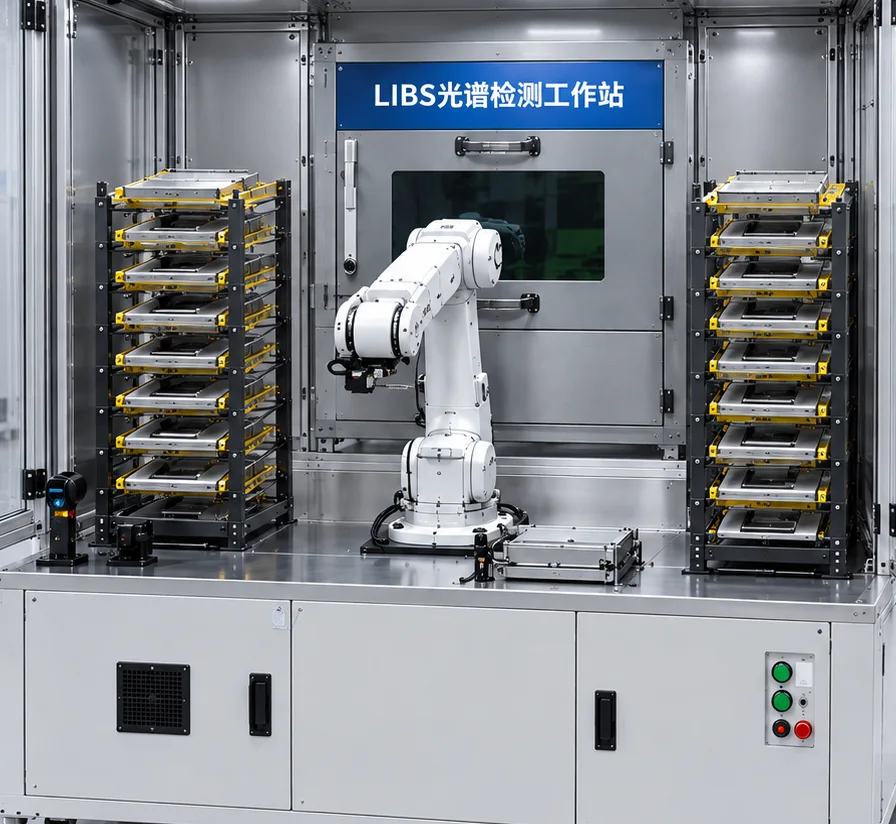
What an unmanned inspection workstation is
It is not LIBS with automation bolted on — it is an unattended platform for batch inspection tasks.
It should not be understood as
Redefined, it is
The business loop
What should not be understood: that this replaces a laboratory, that LIBS is the whole product, or that every sample suits it. What it is: a platform that runs a batch inspection task without an operator.
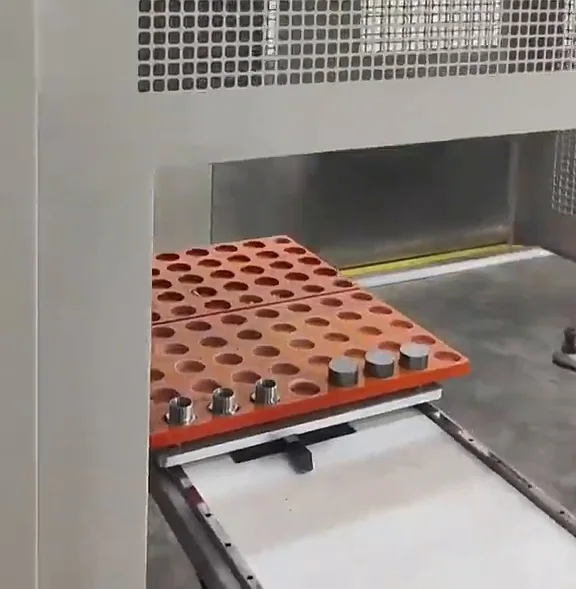
How it relates to storage, handling, vision, inspection and plant planning
Say which section this page owns first, so it does not become a second inspection page.
| Line | What it covers | The part this page uses |
|---|---|---|
| Inspection line | How pass or fail is judged | Inspection items and judgement rules |
| Material storage & feeding | Storage and supply structures | The role the magazine plays in an inspection task |
| Robot & gantry loading | Payload, working range, selection | Picking and carrying inside the cell |
| Vision inspection | Dimensions, appearance, defects | Sample positioning and identification |
| Plant-wide automation | Factory-level planning | This cell as a standalone deployable unit |
| MES & production data | Production management logic | The inspection and sample data produced |
How this page divides work with neighbouring lines. Specifications as stated in the product brochure; final configuration depends on the application.
The inspection page answers how pass or fail is judged; this page answers how a batch inspection task runs automatically and continuously.
Overall product architecture
One host machine + one automated storage unit + robot + vision + N inspection modules + software platform.
| Module | Role | Duties |
|---|---|---|
| Automated storage | Batch loading and buffering | Batch entry, sample numbering, position management, automatic sampling and buffering. |
| Robot | Sampling and carrying | Picking, carrying, loading and unloading, switching inspection stations, sorting and returning samples. |
| Vision system | Recognition and locating | Sample recognition, position, pose, code reading and locating for picking. |
| Inspection modules | Automatic inspection | LIBS, spectroscopy, dimensions, appearance, hardness and metallography configured per project; module capability follows the actual product and the verification result. |
| Judgement system | Result decision | Result judgement, pass or fail, data comparison, thresholds and classification rules. |
| Collection system | Automatic sorting | OK, NG and re-check samples routed by the classification rules. |
| Data management | Archiving and traceability | Sample ID, inspection time, result, items, batch and operation records, archived and reported. |
Workstation modules and their duties. Specifications as stated in the product brochure; final configuration depends on the application.
One host machine, one automated storage unit, a robot, vision, one or more inspection modules and a software platform.
Automated storage
It turns a batch of samples into a queue of scheduled tasks — the dividing line against ordinary automatic inspection equipment.
Traditional way
With the magazine
The magazine turns "a batch of samples" into "a queue of scheduled tasks". That is the dividing line between this workstation and ordinary automatic inspection equipment.
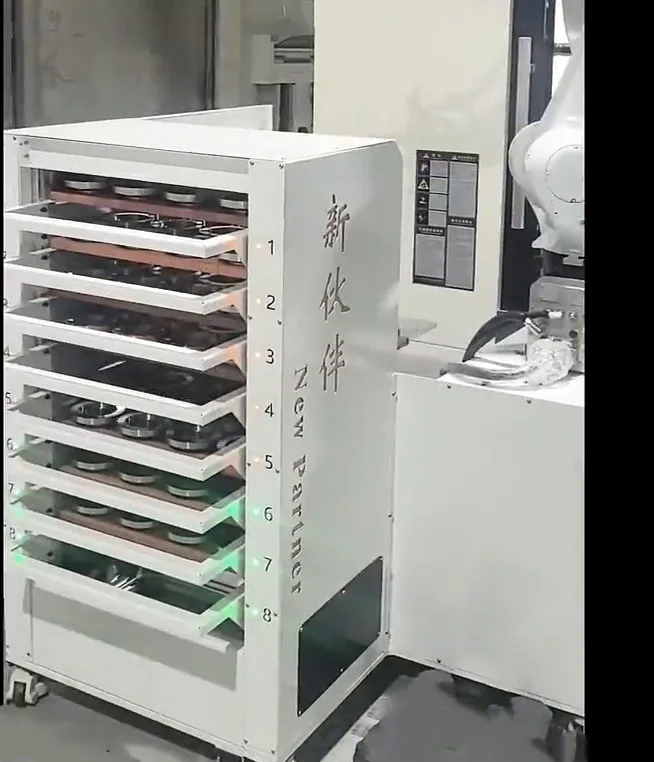
Sample ID management and automatic code reading
The sample ID is the data spine of this product: every result, record and traceability link hangs on it.
Identification methods that can be configured
The sample ID is the data spine of this product: every result, record and traceability link hangs on it. The identification method follows how the samples are marked, and the sample-to-position relation is maintained by the system rather than remembered by a person.
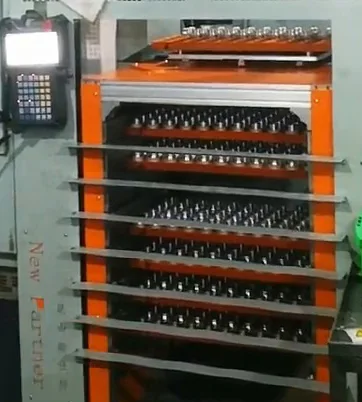
Automatic sampling
Sampling is the part most likely to go wrong in unattended inspection: the more sample forms differ, the harder the common solution.
Sampling is the part most likely to go wrong in unattended inspection: the more sample forms differ, the harder the common solution. The picking method is designed around sample size, shape and weight.
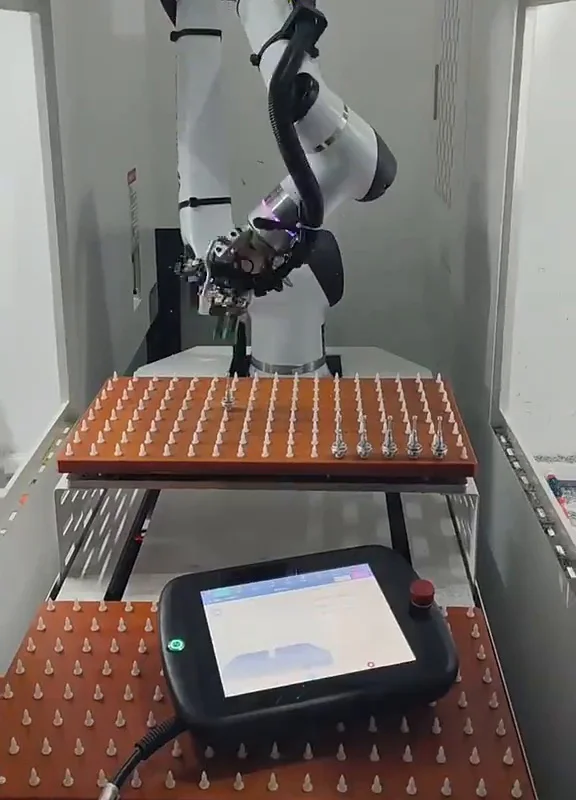
Sample vision recognition
Inside the workstation vision is an automation aid, not the lead role.
Inside the workstation vision is an automation aid: it confirms where the sample is, which way it faces and whether one is there, so the pick can be prepared. Judging pass or fail is the inspection module's job.
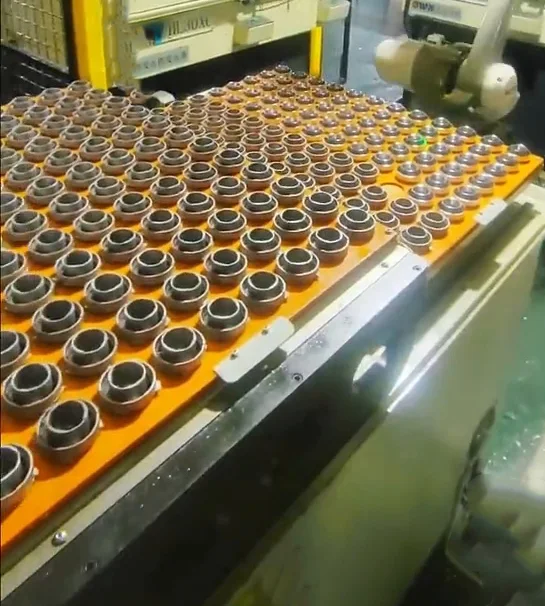
Robot carrying
From the magazine to the inspection position and back to the collection area, the round trip is the robot's job.
The full handling description — payload, working range, selection — is on the robot and gantry loading page.
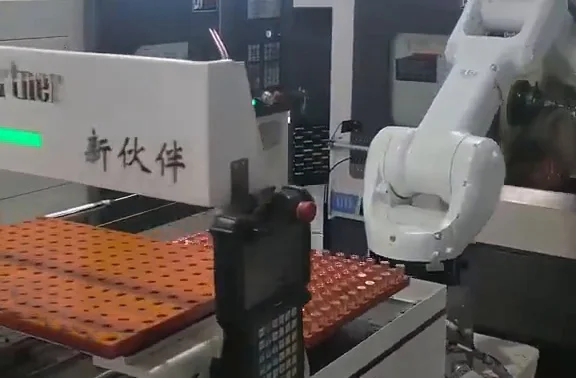
Inspection modules
The inspection module is one capability of the workstation: combinable and expandable, but the boundary has to be clear.
| Module | Status |
|---|---|
| LIBS elemental / composition inspection | The main inspection module in the current reference configuration; capability follows the actual product and project verification. |
| Spectroscopy | Configured per project requirement. |
| Dimensional inspection | Configured per project requirement. |
| Appearance vision inspection | Configured per project requirement. |
| Hardness testing | Configured per project requirement. |
| Metallography | Configured per project requirement. |
| Other modules | Combined after assessing the industry and the inspection requirement. |
Inspection modules and their status. Specifications as stated in the product brochure; final configuration depends on the application.
The inspection module is one capability of the workstation: combinable and expandable, but the capability boundary has to be written clearly.
LIBS elemental and composition inspection module
The main inspection module in the current reference configuration: what it can do is listed item by item, and what it cannot do is drawn out item by item.
What can be done
The robot takes the sample from the magazine and feeds the inspection station.
The mechanism and vision confirm the sample position.
Acquisition and inspection are triggered by the task.
The result is attached to the sample ID automatically.
Raw data and results are stored for query and export.
What is not claimed
What can be done is listed item by item and what cannot is drawn out item by item. The detection range depends on the product and the samples and is confirmed by a sample test.
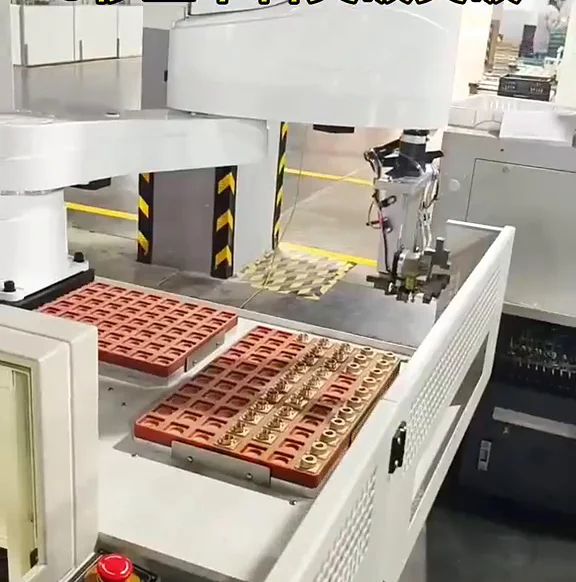
Expanding the inspection capability
The platform can consider other inspection modules where the project requires it.
The platform can consider adding different inspection modules where the project requires it, but compatibility has to be assessed by engineering; beyond the reference configuration these are future extension directions.
Result judgement
The module outputs data; the rules decide the outcome.
Where automatic sorting and the matching control logic are configured, samples are returned to their places by result. How many classes and by which dimension is confirmed at proposal stage.
Automatic sorting
Samples are returned by result where sorting is configured.
Inspection data and traceability
Every record is bound to the sample ID.
| Dimension | Manual | Workstation |
|---|---|---|
| Data item | Manual inspection | Unattended workstation |
| Record keeping | Written by hand | Stored against the sample ID |
| Query | Search paper records | Query and export the stored records |
| Handover | Depends on who was on shift | The system maintains the sample-position map |
| Batch traceability | Batch records kept separately | Batch bound to the sample ID |
Manual inspection and unattended inspection compared on data. Specifications as stated in the product brochure; final configuration depends on the application.
Records and reporting
Records are generated automatically and linked to the sample.
Generated automatically and linked to the sample.
Data organized, exported and reported where the project requires it.
Historical records within the actual software capability.
The data items depend on the actual software capability.
How unattended running is achieved
Four conditions have to hold at the same time.
Unattended running means the system executes a preset inspection task continuously: sampling, inspection, judgement, sorting and archiving in sequence, with exceptions pausing the task, raising an alarm and being recorded.
Four conditions for unattended running
Samples placed as the magazine requires, codes readable.
Inspection modules and robot in normal state, no unhandled alarm.
Task scheduled, inspection items and judgement rules confirmed.
Safety doors, light curtains and interlocks normal; nobody in the danger zone.
Overnight batch inspection
The sequence from the end of one shift to the start of the next.
One batch of samples is loaded, the task and the inspection items are confirmed, and the task is started.
The system samples, inspects, judges, sorts and archives on the preset task; an exception pauses the task, alarms and is recorded.
Results are reviewed, re-check and exception samples are handled, and the data is exported.
How batches are organized
Batch and sample ID binding is what keeps batches from being mixed.
Tasks are organized by batch, order, schedule or material class; the binding between the batch and the sample ID is the key.
Exception handling
What pauses, what is recorded and how the task resumes is all defined before commissioning.
Exception handling is designed with the cell: what pauses, what is recorded and how the task resumes are all defined before commissioning.
Software modules
Current task, sample count, completed count, exception count.
Sample ID, batch, status, position.
Pending, in progress, completed, exception.
Sample, inspection items, result, time.
Historical records, query, export.
The workstation produces inspection, sample and batch data; it does not claim to be a complete MES, QMS or LIMS platform. Interfaces and data exchange are designed against the actual project requirement.
Typical application scenarios
Six scenarios corresponding to six ways of organizing the task.
Laboratory batch inspection
Many samples and heavy piece-by-piece manual work: continuous inspection by task, bulk loading into the magazine.
Company quality center
Large volumes of repeated inspection tasks: queueing and automatic scheduling, with data records as the focus.
Incoming inspection
Incoming samples inspected and recorded in batches: tasks organized by batch, with the batch-to-sample-ID binding as the key.
In-process sampling
Continuous checks during production: scheduled or quantity-based sampling, with the emphasis on continuity and exception response.
Final inspection
Batch quality checks before shipment, with a clear relation between inspection records and shipment records.
Material testing
Batch material composition inspection where the inspection module supports it; suitability for that material is confirmed first.
Six scenarios corresponding to six ways of organizing the task.
Applicable industries and scenario types
These are applicable scenario types, not a customer list.
Manufacturing companies
Workshops and quality departments with many repeated inspection tasks.
Laboratories
Sample batches with a fairly fixed set of inspection items.
Quality centers
Organizations whose main business is batch inspection.
Third-party testing
Testing services needing batch processing and data records.
Factory quality departments
Incoming, in-process and final quality management.
Incoming inspection departments
Batch inspection of incoming samples.
Material testing departments
Composition testing where the module capability supports it.
Metalworking companies
Scenarios around metal sample inspection.
These are applicable scenario types, not a customer list.
Typical workstation configurations
Eight structure references, each matching different inspection items and ways of organizing the task.
Standard single-module workstation
- System
- Magazine, robot, one inspection module, judgement and archiving
Workstation with collection and sorting
- System
- Magazine, robot, inspection module, collection stations for OK / NG / re-check
Workstation with vision identification
- System
- Vision for sample locating, pose and code reading before picking
Multi-module workstation
- System
- Several inspection modules served by one robot
Workstation for in-process sampling
- System
- Sampling tasks connected to production, scheduled or quantity-based
Workstation for incoming batch inspection
- System
- Tasks organized by batch, batch bound to the sample ID
Workstation with MES interface
- System
- Inspection and sample data exchanged with the customer's production system
Workstation with expanded inspection modules
- System
- Additional modules added as the requirement grows
Eight structure references, each matching different inspection items and ways of organizing the task.
Reference configuration
The parameters below come from the company's proposal document and describe the reference configuration; it is a reference, not a general specification.
| Item | Reference parameter |
|---|---|
| Machine dimensions | L2000 × W1500 × H2200 mm |
| Footprint | approx. 3 m² |
| Loading buffer | 10 layers (batch holding of samples to be inspected) |
| Collection buffer | 10 layers (sorted collection of inspected samples) |
| Pallet size | 200 mm × 200 mm standard pallet |
| Continuous operation | one loading supports 20–40 samples inspected without interruption |
| Inspection enclosure | 600 × 500 × 800 mm, welded steel plate with powder coating |
| Vision locating compensation | handles a placement error of ±5 mm |
| Laser safety | designed to GB 7247, the national laser safety standard |
| Communication | PROFINET / TCP-IP / Modbus TCP |
| Software | host software with a database for data storage and reporting |
| Handling unit | six-axis industrial robot (5 kg payload class, 900 mm reach class) |
| End effector | dual air gripper, flexible quick-change, with quick-change mechanism and part-drop protection |
| Code reading | industrial QR / barcode reader |
| HMI | industrial touch screen with parameter setting, status monitoring, fault alarm and history query |
Reference configuration from the standard V1.0 proposal. Specifications as stated in the product brochure; final configuration depends on the application.
These parameters come from the company's proposal document, Automatic LIBS Spectral Acquisition Workstation Technical Solution (Standard V1.0). They describe the reference configuration; it is a reference, not a general specification.
Product model system
The naming structure can be set out now; the model codes wait for the company naming system.
| Item | Content | Note |
|---|---|---|
| Naming structure | Brand + product category + model | The existing company naming system is followed; no new brand name is created. |
| Category word | Smart Inspection Station | Used consistently in external communication. |
| Version suffix | A suffix per inspection module (for example L / V / S / M directions) | The suffix rule is decided by the company naming system. |
Product naming structure. Specifications as stated in the product brochure; final configuration depends on the application.
The naming structure can be set out now; the specific model codes wait for the company naming system to be fixed.
Manual inspection and unattended inspection
An objective dimension-by-dimension comparison: no conclusion, no saving percentage.
| Dimension | Manual inspection | Unattended workstation |
|---|---|---|
| Loading | Sample by sample by hand | Batch loading into the magazine |
| Sampling | A person takes the sample | Robot or mechanism |
| Inspection | Manual, piece by piece | Module triggered by the task |
| Judgement | Depends on the operator | Rules and thresholds in the system |
| Sorting | Manual placing | Routed by result where configured |
| Records | Written or entered by hand | Stored against the sample ID |
| Night capacity | Limited by staffing | Runs the preset task |
| Traceability | Depends on the records kept | Archived with the sample ID |
Manual inspection and the unattended workstation compared. Specifications as stated in the product brochure; final configuration depends on the application.
An objective dimension-by-dimension comparison: no conclusion and no saving percentage.
Project implementation
Nine steps: the requirement first, then the samples, then the equipment.
Inspection items, sample forms, batch size and target output.
Recognition, picking, inspection and judgement verified on real samples.
Modules, magazine, robot, judgement rules and data items.
Cell layout, fixtures, enclosure and safety design.
Manufacture and assembly.
Task flow, exception handling and data records verified.
On-site installation and connection.
Operators trained on tasks, samples and exceptions.
Production support once the task is in routine use.
Nine steps: the requirement first, then the samples, and only then the equipment.
Why a sample test comes first
The sample test is the only basis for feasibility: the equipment model cannot decide whether the configuration works.
| Dimension | Possible effect |
|---|---|
| Difference dimension | Possible effect |
| Sample form | Picking method and fixture design |
| Sample surface | Imaging for code reading and vision |
| Sample marking | Whether identification is reliable |
| Inspection item | Which module is needed |
| Batch size | Magazine capacity and task organization |
| Judgement rule | How pass, fail and re-check are defined |
How sample differences affect automation. Specifications as stated in the product brochure; final configuration depends on the application.
The sample test is the only basis for feasibility: the equipment model cannot decide whether the configuration works.
Project cases
The case library is being added to; below are the field structure and the admission rules.
Four admission rules
Closed real projects only
A case comes from a closed project with permission to use the customer name.
No unmeasured numbers
Inspection accuracy, speed, capacity and savings are not written without measured data.
De-identification
Customer information without permission is de-identified.
Verifiability
Key content is verifiable through site photos or project material.
What a case has to record
No closed inspection workstation project with customer disclosure permission is in the material yet, so no case is shown.
No closed workstation project with customer disclosure permission is in the material yet, so no case is shown.
Information the customer needs to provide
Four groups; prepare them in this priority order.
Sample information
Inspection requirement
Equipment and site
System and interfaces
Four groups of information; prepare them in this priority order.
FAQ
Fourteen questions buyers and quality managers actually ask.
What is an unmanned inspection workstation?
It combines automated storage, a robot, vision recognition, inspection modules and a data system to inspect batches of samples automatically. The core is organizing a batch inspection task into a flow that can run continuously.
How does it differ from ordinary automatic inspection equipment?
Ordinary automatic inspection equipment answers how to inspect. This workstation answers how a large batch of inspection tasks runs automatically, continuously and unattended — including batch loading, sampling, carrying, judgement, sorting and data archiving.
How many samples can be loaded at once?
It depends on sample size, magazine structure, inspection cycle and the project requirement; there is no single fixed number. In the reference configuration the magazine has 10 layers top and bottom and takes 200 × 200 mm pallets, supporting 20–40 samples inspected continuously in one loading; the actual figure is designed per project.
Can it run overnight automatically?
Where the equipment state, sample preparation, inspection task and safety conditions are all satisfied, it runs the preset task continuously. When an exception occurs it pauses, alarms and records according to the exception handling rules.
Does it sort automatically after inspection?
Where an automatic sorting mechanism and the matching control logic are configured, samples are returned by result — OK, NG and re-check. How many classes and by which dimension is confirmed at proposal stage.
Can it read codes automatically?
Where the project requires it, barcode, QR code, Data Matrix or character recognition can be configured so the code is read and bound to the sample.
Can LIBS inspection be used?
Where the workstation is configured with a LIBS module, LIBS is integrated as an automatic inspection module: automatic sampling, automatic locating, automatic inspection and automatic binding of the result to the sample ID.
Can LIBS detect every material and element?
That cannot be claimed. The detection range depends on the actual product capability and the samples, and is confirmed by a sample test. This page does not say that every element or every material can be detected.
Can other inspection equipment be added later?
The platform design can consider adding different inspection modules where the project requires it (spectroscopy, dimensions, vision, hardness, metallography and others), but compatibility has to be assessed by engineering. Beyond the reference configuration these are future extension directions.
Can it connect to MES, LIMS or QMS?
Interfaces and data exchange can be designed against the actual project requirement. The workstation itself provides inspection, sample and batch data; it does not claim to be a complete MES, QMS or LIMS platform.
Is an operator completely unnecessary?
The workstation mainly removes repeated piece-by-piece work, but sample preparation, equipment maintenance, exception handling and special tasks may still need a person.
Are all samples suitable for unattended inspection?
No. It has to be assessed from the sample form, the inspection requirement, the inspection cycle, the automatic sampling method and the capability of the inspection module.
How is inspection data made traceable?
The sample ID links the sample, the inspection task, the inspection module, the result, the time and the operation records into a queryable, exportable record. The specific data items follow the actual software capability.
How is safety handled?
The design follows the safety requirements of the equipment and the inspection modules: safety fence and door lock, a protected enclosure at the inspection station, laser safety protection, fume extraction and exception interlocks. The details are fixed per project and per module.
Answers for AI search and assistant results
Written for search engines and AI retrieval, aiming to be accurate and quotable.
A cell that combines automated storage, a robot, vision and inspection modules with a data system to run a batch of inspection tasks automatically: bulk loading, sampling, inspection, judgement, sorting and archiving.
It follows sample size, magazine structure and inspection cycle. The reference configuration has 10 layers top and bottom with 200 × 200 mm pallets and supports 20–40 samples per loading.
It runs the preset task continuously while equipment state, sample preparation, task and safety conditions hold; exceptions pause the task, alarm and are recorded.
Where a sorting mechanism and control logic are configured, samples are returned by result — OK, NG and re-check.
No such claim is made. The detection range depends on the product capability and the samples and is confirmed by a sample test.
Whether samples can be identified, picked, inspected and judged only shows up on the real samples; the equipment model cannot decide feasibility.
- In short
- The scenario
- What it is
- Scope
- Architecture
- Storage magazine
- Sample ID
- Sampling
- Vision
- Carrying
- Inspection modules
- LIBS
- Extension
- Judgement
- Sorting
- Data
- Reports
- Unattended running
- Overnight
- Batch organization
- Exceptions
- Software
- Scenarios
- Applicable industries
- Configurations
- Reference configuration
- Naming
- Comparison
- Implementation
- Sample test
- Cases
- What we need
- FAQ
- AI answers
- Related
- Assessment
Send the machine brand/model, part drawing or photo, blank and finished-part handling, single or multi-machine layout, target cycle and acceptance requirements.
Request an assessment Call +86 150 5020 2625